 USD
 EUR
 GBP
 CAD
 AUD
 JPY
 SGD
 MYR
 PLN
 IDR
 PHP

Customers Who Viewed This Product Also Viewed

- [Pre-Order] 4th Party CM-007 Transformers: Ag..
-
Dep. $1.00
Full Unknown


- [Pre-Order] 4th Party MD-006 Transformers SS8..
-
Dep. $1.00
Full Unknown


- 4th Party JCS-001G Nova Storm..
- $ 24.99
- Description
Find Similar Products by Category
Theme:
Transformers
Product Type:
Upgrade Kit
Company:
Shockwave Lab
Character:
Shockwave
Featured In:
Transformers Movie (2007-)
Scale
Others
Availability:
Sold Out
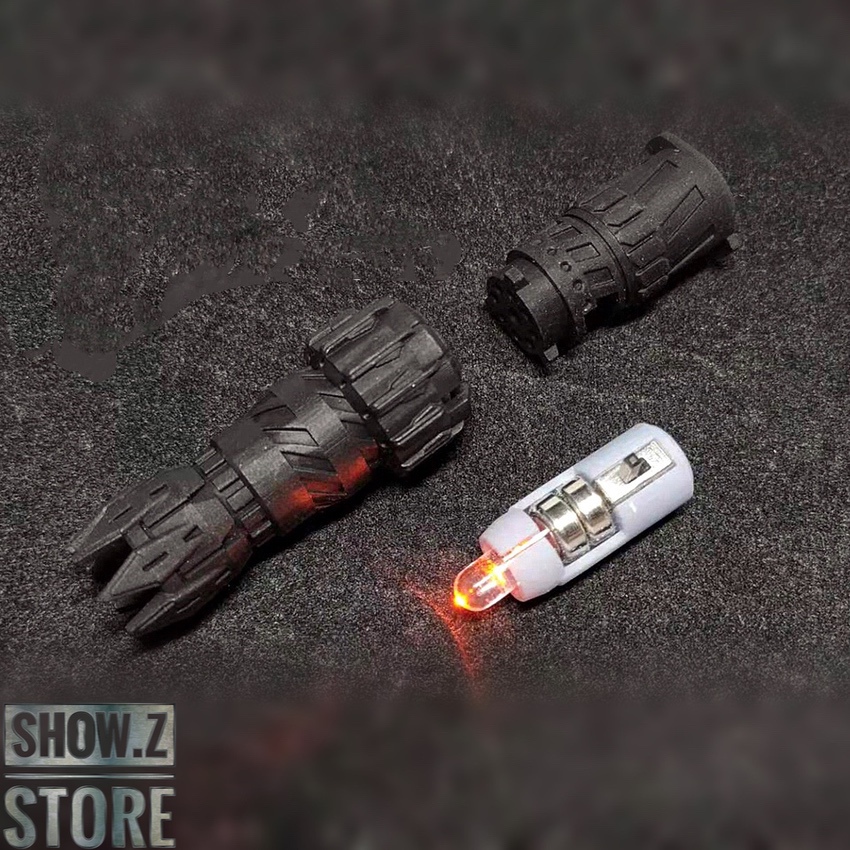
Shockwave Lab SL-70 LED Blaster Upgrade Kit for Studio Series SS-56 Shockwave
Material: Resin
Height: N/a
Include:
- 3 Blaster parts
- 2 Button cells (Battery type: AG3 or LR41)
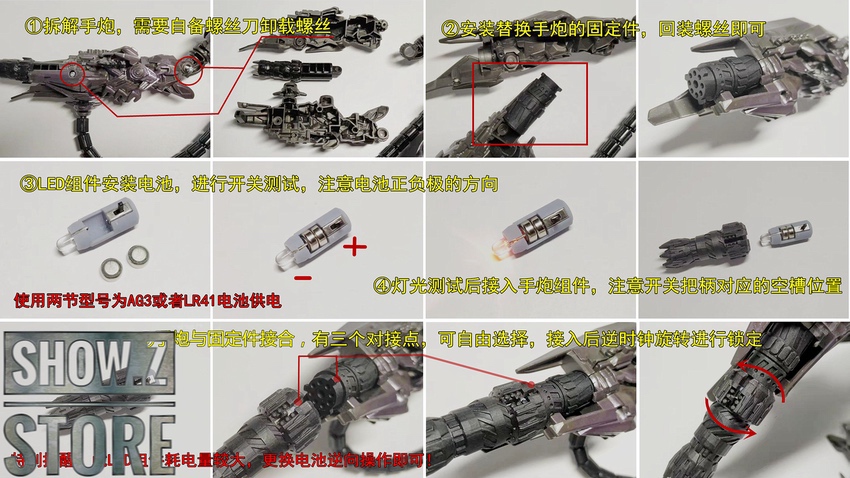
How to install the LED Blaster:
- Dismantle the right on the figure (2 screws need to be removed ).
- Replace the original blaster with the base part of the blaster, and then reassemble the arm.
- Put the button cells into the LED parts, test the light effect (pay attention to the positive and negative ends)
- Insert the LED part into the blaster part, make sure the switch is fit to the reserved slot on the blaster part.
- Connect the blaster part to the base part, find the 3 connectors, plug in and rotate counter clockwise to lock.
* Figure shown in the pictures is not included
07/22/2021
Shockwave Lab SL-70 LED Blaster Upgrade Kit for Studio Series SS-56 Shockwave
Pictures updated.


![]()
Material: Resin
Height: N/a
Include:
- 3 Blaster parts
- 2 Button cells (Battery type: AG3 or LR41)
How to install the LED Blaster:
- Dismantle the right on the figure (2 screws need to be removed ).
- Replace the original blaster with the base part of the blaster, and then reassemble the arm.
- Put the button cells into the LED parts, test the light effect (pay attention to the positive and negative ends)
- Insert the LED part into the blaster part, make sure the switch is fit to the reserved slot on the blaster part.
- Connect the blaster part to the base part, find the 3 connectors, plug in and rotate counter clockwise to lock.
* Figure shown in the pictures is not included
07/22/2021
Shockwave Lab SL-70 LED Blaster Upgrade Kit for Studio Series SS-56 Shockwave
Pictures updated.